728x90
반응형
다이얼로그 시계

<?xml version="1.0" encoding="utf-8"?>
<LinearLayout
    xmlns:android="http://schemas.android.com/apk/res/android"
    android:layout_width="match_parent"
    android:layout_height="match_parent"
    android:orientation="vertical">

    <AnalogClock
        android:layout_width="match_parent"
        android:layout_height="wrap_content"/>
    <DigitalClock
        android:layout_width="match_parent"
        android:layout_height="wrap_content"
        android:gravity="center"/>

</LinearLayout>
시간측정

<?xml version="1.0" encoding="utf-8"?>
<LinearLayout
    xmlns:android="http://schemas.android.com/apk/res/android"
    android:layout_width="match_parent"
    android:layout_height="match_parent">

    <Chronometer
        android:id="@+id/chronometer1"
        android:layout_width="match_parent"
        android:layout_height="wrap_content"
        android:format="시간 측정 : %s"
        android:gravity="center"
        android:textSize="30dp"/>
</LinearLayout>
달력
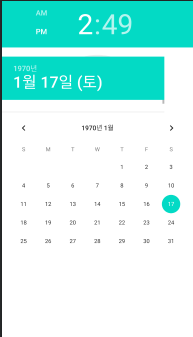
<?xml version="1.0" encoding="utf-8"?>
<LinearLayout
    xmlns:android="http://schemas.android.com/apk/res/android"
    android:layout_width="match_parent"
    android:layout_height="match_parent"
    android:orientation="vertical">
    <TimePicker
        android:layout_width="match_parent"
        android:layout_height="120dp"/>

    <DatePicker
        android:layout_width="match_parent"
        android:layout_height="120dp"/>
    <CalendarView
        android:layout_width="match_parent"
        android:layout_height="match_parent"
        android:showWeekNumber="false"/>
</LinearLayout>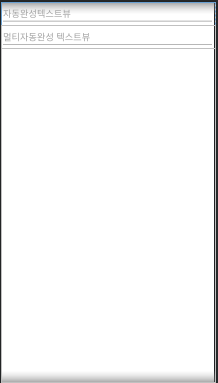
<?xml version="1.0" encoding="utf-8"?>
<LinearLayout
    xmlns:android="http://schemas.android.com/apk/res/android"
    android:layout_width="match_parent"
    android:layout_height="match_parent"
    android:orientation="vertical">

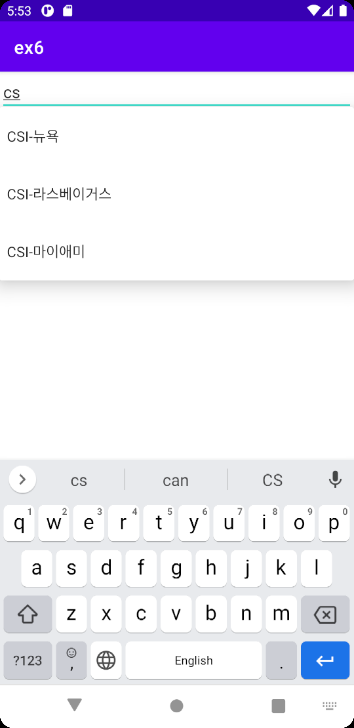
    <AutoCompleteTextView
        android:layout_width="match_parent"
        android:layout_height="wrap_content"
        android:id="@+id/autoCompleteTextView1"
        android:hint="자동완성텍스트뷰"
        android:completionThreshold="1">

    </AutoCompleteTextView>
    <MultiAutoCompleteTextView
        android:layout_width="match_parent"
        android:layout_height="wrap_content"
        android:id="@+id/multiAutoCompleteTextView1"
        android:hint="멀티자동완성 텍스트뷰"
        android:completionThreshold="1">

    </MultiAutoCompleteTextView>
</LinearLayout>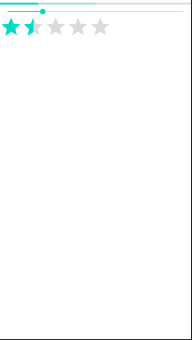
<?xml version="1.0" encoding="utf-8"?>
<LinearLayout
    xmlns:android="http://schemas.android.com/apk/res/android"
    android:layout_width="match_parent"
    android:layout_height="match_parent"
    android:orientation="vertical">

    <ProgressBar
        android:layout_width="match_parent"
        android:layout_height="wrap_content"
        style="?android:attr/progressBarStyleHorizontal"
        android:max="100"
        android:progress="20"
        android:secondaryProgress="50"/>
    <SeekBar
        android:layout_width="match_parent"
        android:layout_height="wrap_content"
        android:progress="20"/>
    <RatingBar
        android:layout_width="wrap_content"
        android:layout_height="wrap_content"
        android:numStars="5"
        android:rating="1.5"
        android:stepSize="0.5"/>

</LinearLayout>
스크롤 뷰

<?xml version="1.0" encoding="utf-8"?>
<ScrollView
    xmlns:android="http://schemas.android.com/apk/res/android"
    android:layout_width="match_parent"
    android:layout_height="match_parent"
    android:orientation="vertical">

    <LinearLayout
        android:layout_width="fill_parent"
        android:layout_height="fill_parent"
        android:orientation="vertical">

        <Button
            android:layout_width="match_parent"
            android:layout_height="100dp"
            android:text="버튼1"/>
        <Button
            android:layout_width="match_parent"
            android:layout_height="100dp"
            android:text="버튼2"/>
        <Button
            android:layout_width="match_parent"
            android:layout_height="100dp"
            android:text="버튼3"/>
        <Button
            android:layout_width="match_parent"
            android:layout_height="100dp"
            android:text="버튼4"/>
        <Button
            android:layout_width="match_parent"
            android:layout_height="100dp"
            android:text="버튼5"/>
        <Button
            android:layout_width="match_parent"
            android:layout_height="100dp"
            android:text="버튼6"/>
        <Button
            android:layout_width="match_parent"
            android:layout_height="100dp"
            android:text="버튼6"/>
        <Button
            android:layout_width="match_parent"
            android:layout_height="100dp"
            android:text="버튼6"/>
        <Button
            android:layout_width="match_parent"
            android:layout_height="100dp"
            android:text="버튼6"/>
        <Button
            android:layout_width="match_parent"
            android:layout_height="100dp"
            android:text="버튼6"/>

    </LinearLayout>

</ScrollView>
손잡이를 당기면 나오는

<?xml version="1.0" encoding="utf-8"?>
<LinearLayout
    xmlns:android="http://schemas.android.com/apk/res/android"
    android:layout_width="match_parent"
    android:layout_height="match_parent"
    android:orientation="vertical">

    <TextView
        android:layout_width="match_parent"
        android:layout_height="wrap_content"
        android:text="여기는 서랍 밖입니다."/>

    <SlidingDrawer
        android:layout_width="match_parent"
        android:layout_height="match_parent"
        android:content="@+id/content"
        android:handle="@+id/handle">

        <Button
            android:layout_width="wrap_content"
            android:layout_height="wrap_content"
            android:id="@+id/handle"
            android:text="서랍 손잡이"/>

        <LinearLayout
            android:layout_width="match_parent"
            android:layout_height="wrap_content"
            android:id="@+id/content"
            android:background="#FF0000"
            android:gravity="center">

            <TextView
                android:layout_width="match_parent"
                android:layout_height="wrap_content"
                android:text="여기는 서랍 안입니다."
                android:textSize="20dp"/>

        </LinearLayout>

    </SlidingDrawer>
</LinearLayout>
728x90
반응형
'App > Android Studio' 카테고리의 다른 글
| 휴대폰 테스트 설정 / 앱 배포 (0) | 2022.10.14 |
|---|---|
| 안드로이드 개발 가이드 문서 링크 (0) | 2022.05.16 |
| 기본 레이아웃 (0) | 2021.07.01 |
| Activity All finish (0) | 2021.06.11 |
| Intent (0) | 2021.06.10 |
| SDK 다운로드 (0) | 2021.06.09 |