728x90
반응형
Scaffold - 머터리얼 디자인에서 복장한 사용자 인터페이스를 위한 표준화된 플랫폼을 제공하는 기본 구조
앱 바와 플로팅 작업 버튼과 같은 UI의 부분에 추가하여 일관성 있는 디자인과 느낌을 주게 함

이게 기본 구성
여기에 스크롤 기능이랑 뒤로 가기 버튼을 적용하면
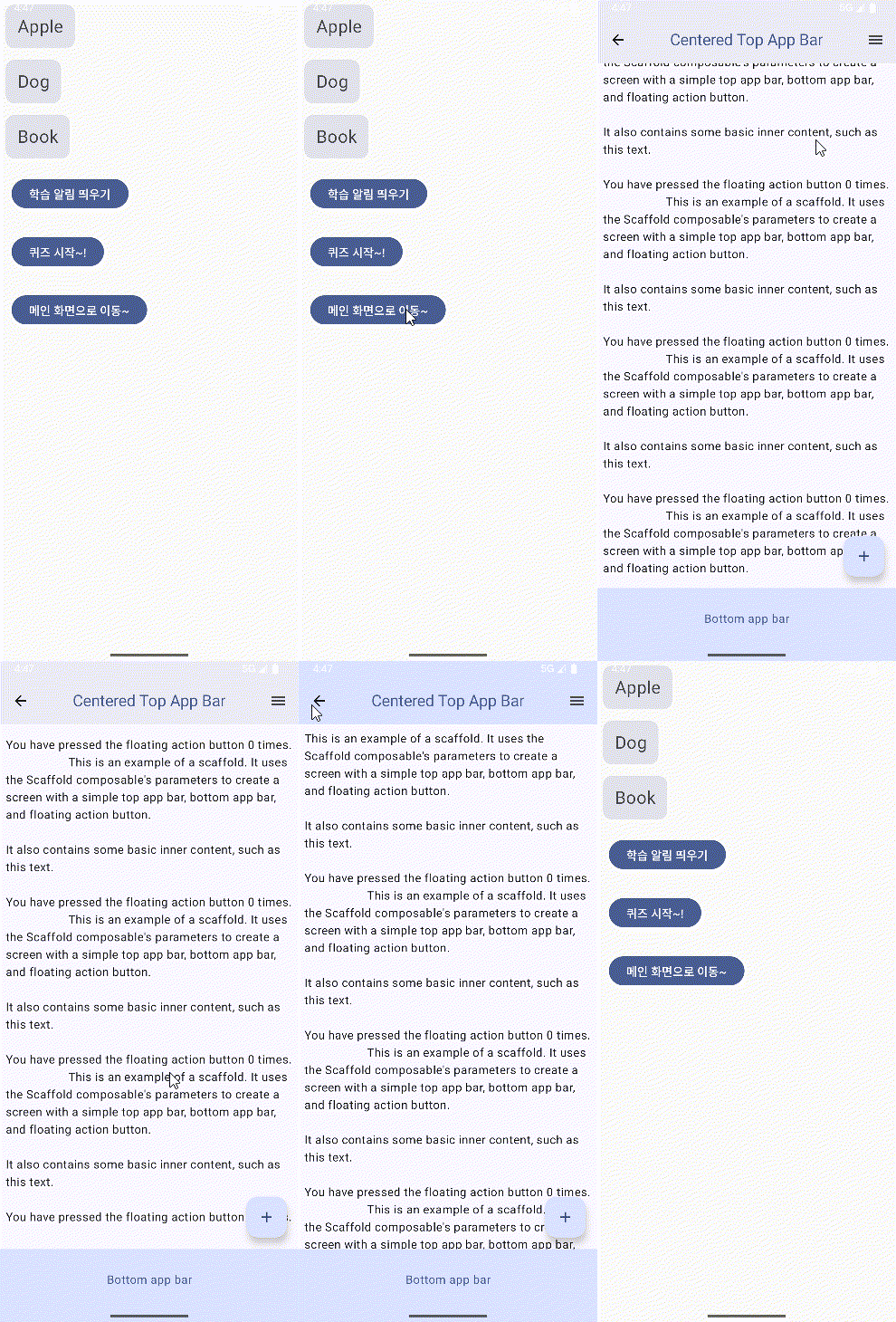
package com.example.wordapp.ui.main

import androidx.compose.foundation.layout.Arrangement
import androidx.compose.foundation.layout.fillMaxWidth
import androidx.compose.foundation.layout.padding
import androidx.compose.foundation.lazy.LazyColumn
import androidx.compose.material.icons.Icons
import androidx.compose.material.icons.automirrored.filled.ArrowBack
import androidx.compose.material.icons.filled.Add
import androidx.compose.material.icons.filled.Menu
import androidx.compose.material3.*
import androidx.compose.runtime.*
import androidx.compose.ui.Modifier
import androidx.compose.ui.input.nestedscroll.nestedScroll
import androidx.compose.ui.text.style.TextAlign
import androidx.compose.ui.text.style.TextOverflow
import androidx.compose.ui.unit.dp
import androidx.navigation.NavController

@OptIn(ExperimentalMaterial3Api::class)
@Composable
fun MainScreen(navController: NavController) {
    var presses by remember { mutableIntStateOf(0) }
    val scrollBehavior = TopAppBarDefaults.pinnedScrollBehavior(rememberTopAppBarState())
    Scaffold(
        modifier = Modifier.nestedScroll(scrollBehavior.nestedScrollConnection),
        topBar = {
            CenterAlignedTopAppBar(
                colors = TopAppBarDefaults.centerAlignedTopAppBarColors(
                    containerColor = MaterialTheme.colorScheme.primaryContainer,
                    titleContentColor = MaterialTheme.colorScheme.primary,
                ),
                title = {
                    Text(
                        "Centered Top App Bar",
                        maxLines = 1,
                        overflow = TextOverflow.Ellipsis
                    )
                },
                navigationIcon = {
                    IconButton(onClick = { navController.popBackStack() }) { // 뒤로가기
//                    IconButton(onClick = { /* do something */ }) {
                        Icon(
                            imageVector = Icons.AutoMirrored.Filled.ArrowBack,
                            contentDescription = "Localized description"
                        )
                    }
                },
                actions = {
                    IconButton(onClick = { /* do something */ }) {
                        Icon(
                            imageVector = Icons.Filled.Menu,
                            contentDescription = "Localized description"
                        )
                    }
                },
                scrollBehavior = scrollBehavior,
            )
//            TopAppBar(
//                colors = topAppBarColors(
//                    containerColor = MaterialTheme.colorScheme.primaryContainer,
//                    titleContentColor = MaterialTheme.colorScheme.primary,
//                ),
//                title = {
//                    Text("Top app bar")
//                }
//            )
        },
        bottomBar = {
            BottomAppBar(
                containerColor = MaterialTheme.colorScheme.primaryContainer,
                contentColor = MaterialTheme.colorScheme.primary,
            ) {
                Text(
                    modifier = Modifier
                        .fillMaxWidth(),
                    textAlign = TextAlign.Center,
                    text = "Bottom app bar",
                )
            }
        },
        floatingActionButton = {
            FloatingActionButton(onClick = { presses++ }) {
                Icon(Icons.Default.Add, contentDescription = "Add")
            }
        }
    ) { innerPadding ->
        LazyColumn( //LazyColumn을 사용해야 스크롤이 됨
            modifier = Modifier
                .padding(innerPadding),
            verticalArrangement = Arrangement.spacedBy(16.dp),
        ) {
            item { // LazyColumn을 사용하면 item 안에서 Text를 선언해야함
                Text(
                    modifier = Modifier.padding(8.dp),
                    text =
                        """
                    This is an example of a scaffold. It uses the Scaffold composable's parameters to create a screen with a simple top app bar, bottom app bar, and floating action button.

                    It also contains some basic inner content, such as this text.

                    You have pressed the floating action button $presses times.
                                        This is an example of a scaffold. It uses the Scaffold composable's parameters to create a screen with a simple top app bar, bottom app bar, and floating action button.

                    It also contains some basic inner content, such as this text.

                    You have pressed the floating action button $presses times.
                                        This is an example of a scaffold. It uses the Scaffold composable's parameters to create a screen with a simple top app bar, bottom app bar, and floating action button.

                    It also contains some basic inner content, such as this text.

                    You have pressed the floating action button $presses times.
                                        This is an example of a scaffold. It uses the Scaffold composable's parameters to create a screen with a simple top app bar, bottom app bar, and floating action button.

                    It also contains some basic inner content, such as this text.

                    You have pressed the floating action button $presses times.
                                        This is an example of a scaffold. It uses the Scaffold composable's parameters to create a screen with a simple top app bar, bottom app bar, and floating action button.

                    It also contains some basic inner content, such as this text.

                    You have pressed the floating action button $presses times.
                                        This is an example of a scaffold. It uses the Scaffold composable's parameters to create a screen with a simple top app bar, bottom app bar, and floating action button.

                    It also contains some basic inner content, such as this text.

                    You have pressed the floating action button $presses times.

                """.trimIndent(),
                )
            }
        }
    }
}
728x90
반응형
'App > Kotlin' 카테고리의 다른 글
| 옵트인(Opt-in) (0) | 2025.03.25 |
|---|---|
| 간단한 단어퀴즈 앱 만들기 (2) | 2025.03.24 |
| 코틀린 시작하기 (1) | 2025.03.21 |