728x90
반응형
Spring boot
template
종속성
Srping Boot DevTools
Lombok
Spring Data JPA
mariaDB Driver
Spring Security
Mustache
Spring Web
간단하게 웹에서 회원가입 (비밀번호 암호화) , 페이지 인증처리, JPA 테이블 생성, bean 으로 Ioc 설정을 해보자
완성본을 올리는거라 순서는 안맞음
indexController
package com.example.security.controller;

import com.example.security.model.User;
import com.example.security.repository.UserRepository;
import org.springframework.beans.factory.annotation.Autowired;
import org.springframework.security.crypto.bcrypt.BCryptPasswordEncoder;
import org.springframework.stereotype.Controller;
import org.springframework.web.bind.annotation.GetMapping;
import org.springframework.web.bind.annotation.PostMapping;

// view 를 리턴
@Controller
public class IndexController {

    @Autowired
    private UserRepository userRepository;

    @Autowired
    private BCryptPasswordEncoder passwordEncoder;

    @GetMapping({"", "/"})
    public String index() {
        // 머스테치 기본폴더 src/main/resources
        // 뷰 리졸버 설정 :  templates (prefix), mustache(suffix) 생략가능
        return "index";  // src/main/resources/
    }

    @GetMapping("/user")
    public String user() {
        return "user";
    }

    @GetMapping("/admin")
    public String admin() {
        return "admin";
    }

    @GetMapping("/manager")
    public String manager() {
        return "manager";
    }

    @GetMapping("/loginForm")
    public String loginForm() {
        return "loginForm";
    }

    @GetMapping("/joinForm")
    public String joinForm() {
        return "joinForm";
    }

    @PostMapping("/join")
    public String join(User user) {
        System.out.println(user);
        user.setRole("ROLE_USER");
        // 이렇게 하면 회원가입은 잘 된다 하지만 security 로 로그인 할 수없음
        // 이유 : 패스워드가 암호화가 안되어서
        String rawPw = user.getPassword();
        String encPw = passwordEncoder.encode(rawPw);
        user.setPassword(encPw);
        userRepository.save(user);
       return "redirect:/loginForm";
    }
}
WebMvcconfig
현재 template 를 사용중이라 Config 설정을 해주자
package com.example.security.config;

import org.springframework.boot.web.servlet.view.MustacheViewResolver;
import org.springframework.context.annotation.Configuration;
import org.springframework.web.servlet.config.annotation.ViewResolverRegistry;
import org.springframework.web.servlet.config.annotation.WebMvcConfigurer;

//Ioc 등록을 위해
@Configuration
public class WebMvcConfig implements WebMvcConfigurer {

    // MustacheViewResolver 를 재설정 가능
    @Override
    public void configureViewResolvers(ViewResolverRegistry registry) {
        MustacheViewResolver viewResolver = new MustacheViewResolver();
        viewResolver.setCharset("UTF-8");
        viewResolver.setContentType("text/html; charset=UTF-8");
        viewResolver.setPrefix("classpath:/templates/");
        viewResolver.setSuffix(".html");

        // viewResolver 등록
        registry.viewResolver(viewResolver);

    }
}
application.properties
spring.jpa.hibernate.ddl-auto=create
# create로 설정한 이유 : 데이터베이스 구조가 없음 텅빈 깡통이여서
spring.datasource.url=jdbc:mariadb://localhost:3306/[db이름]?characterEncoding=UTF-8&serverTimezone=UTC
spring.datasource.username=[계정명]
spring.datasource.password=[비밀번호]
spring.datasource.driver-class-name=org.mariadb.jdbc.Driver

spring.mvc.view.prefix=/templates/
spring.mvc.view.suffix=.html
model 을 만들자
package com.example.security.model;

import lombok.Data;
import org.hibernate.annotations.CreationTimestamp;

import javax.persistence.Entity;
import javax.persistence.GeneratedValue;
import javax.persistence.GenerationType;
import javax.persistence.Id;
import java.sql.Timestamp;

@Entity
@Data
public class User {

    @Id
    @GeneratedValue(strategy = GenerationType.AUTO)
    private int id;
    private String username;
    private String password;
    private String email;
    private String role;
    @CreationTimestamp
    private Timestamp createDate;

}
q이렇게 설정하고 실행하면 아마 데이터베이스에 테이블이 생성되어있을거임ㅇㅇ
만약 안된다면 데이터 베이스를 만들지 않았을거니까 데이터 베이스를 만들고
properties 에 데이터베이스 이름을 넣어서 다시 실행해보자 ㅇㅇ
url / 권한 설정을 위해 SecurityConfig 작성
package com.example.security.config;

import org.springframework.context.annotation.Bean;
import org.springframework.context.annotation.Configuration;
import org.springframework.security.config.annotation.web.builders.HttpSecurity;
import org.springframework.security.config.annotation.web.configuration.EnableWebSecurity;
import org.springframework.security.config.annotation.web.configuration.WebSecurityConfigurerAdapter;
import org.springframework.security.crypto.bcrypt.BCryptPasswordEncoder;

// Ioc 등록
@Configuration
// web 활성화를 위한 어노테이션 spring security filter 가 스프링 필터체인에 등록
@EnableWebSecurity
public class SecurityConfig extends WebSecurityConfigurerAdapter {

    // @Bean 해당 메서드의 리턴되는 오브젝트를 Ioc 로 등록해줌
    @Bean
    public BCryptPasswordEncoder passwordEncoder() {
        return new BCryptPasswordEncoder();
    }

    @Override
    protected void configure(HttpSecurity http) throws Exception {
        http.csrf().disable();
        http.authorizeRequests()
                // 인증 필 / 인증 필요 + ADMIN, MANAGER 권한 필 / ADMIN 권한 필
                .antMatchers("/user/**").authenticated()
                .antMatchers("/manager/**").access("hasRole('ROLE_ADMIN') or hasRole('ROLE_MANAGER')")
                .antMatchers("/admin/**").access("hasRole('ROLE_ADMIN')")
                // 위의 권한 빼고는 다 진입가능하게 함
                .anyRequest().permitAll()
                .and()
                .formLogin()
                // 위 권한으로 접속시에는 login 페이지로 이동하게 됨
                .loginPage("/loginForm");
    }
}
UserRepositoy
package com.example.security.repository;

import com.example.security.model.User;
import org.springframework.data.jpa.repository.JpaRepository;

// crud 함수를 JpaRepository 가 들고 있음
// Repository 어노테이션이 없어도 Ioc 됨
public interface UserRepository extends JpaRepository <User, Integer>{
}
resources/templates/ ...
index.html
<!DOCTYPE html>
<html lang="en">
<head>
    <meta charset="UTF-8">
    <title>인덱스 페이지</title>
</head>
<body>
<h1>인데스 페이지</h1>
</body>
</html>
joinForm.html
<!DOCTYPE html>
<html lang="en">
<head>
    <meta charset="UTF-8">
    <title>회원가입 페이지</title>
</head>
<body>
<h1>회원가입 페이지</h1>
</hr>
<form action="/join" method="post">
    <input type="text" name="username" placeholder="Username"/> </br>
    <input type="password" name="password" placeholder="Password"/> </br>
    <input type="email" name="email" placeholder="Email"/> </br>
    <button>회원가입 버튼</button>
</form>
</body>
</html>
loginForm.html
<!DOCTYPE html>
<html lang="en">
<head>
    <meta charset="UTF-8">
    <title>로그인 페이지</title>
</head>
<body>
<h1>로그인 페이지</h1>
</hr>
<form>
    <input type="text" name="username" placeholder="Username"/> </br>
    <input type="password" name="password" placeholder="Password"/> </br>
    <button>로그인 버튼</button>
</form>
<a href="/joinForm">회원가입을 아직 하지 않으셨나?</a>

</body>
</html>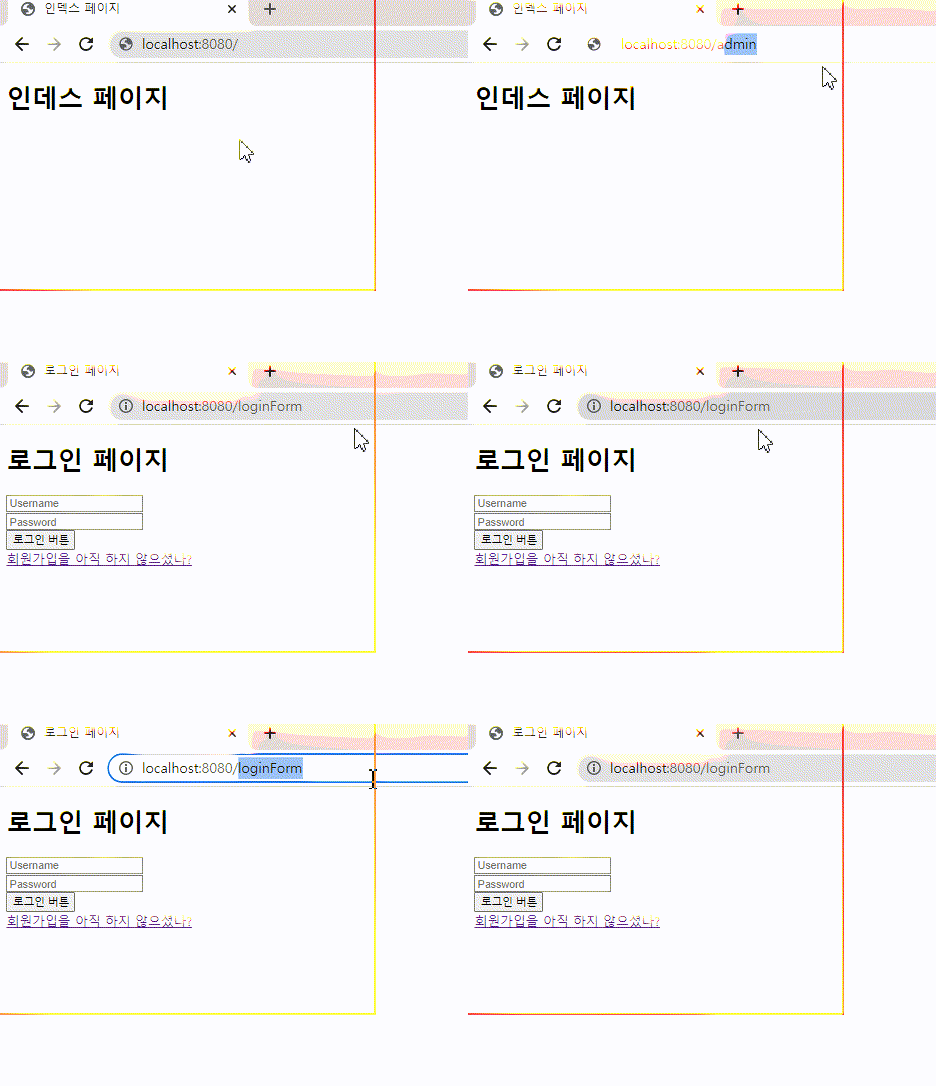
일단 SecurityConfig 에서 설정한 것처럼 권한과 인증이 필요한 페이지로 url을 입력하면 위 캡쳐처럼 loginForm 으로 잘 감
그럼 회원가입을 해보자
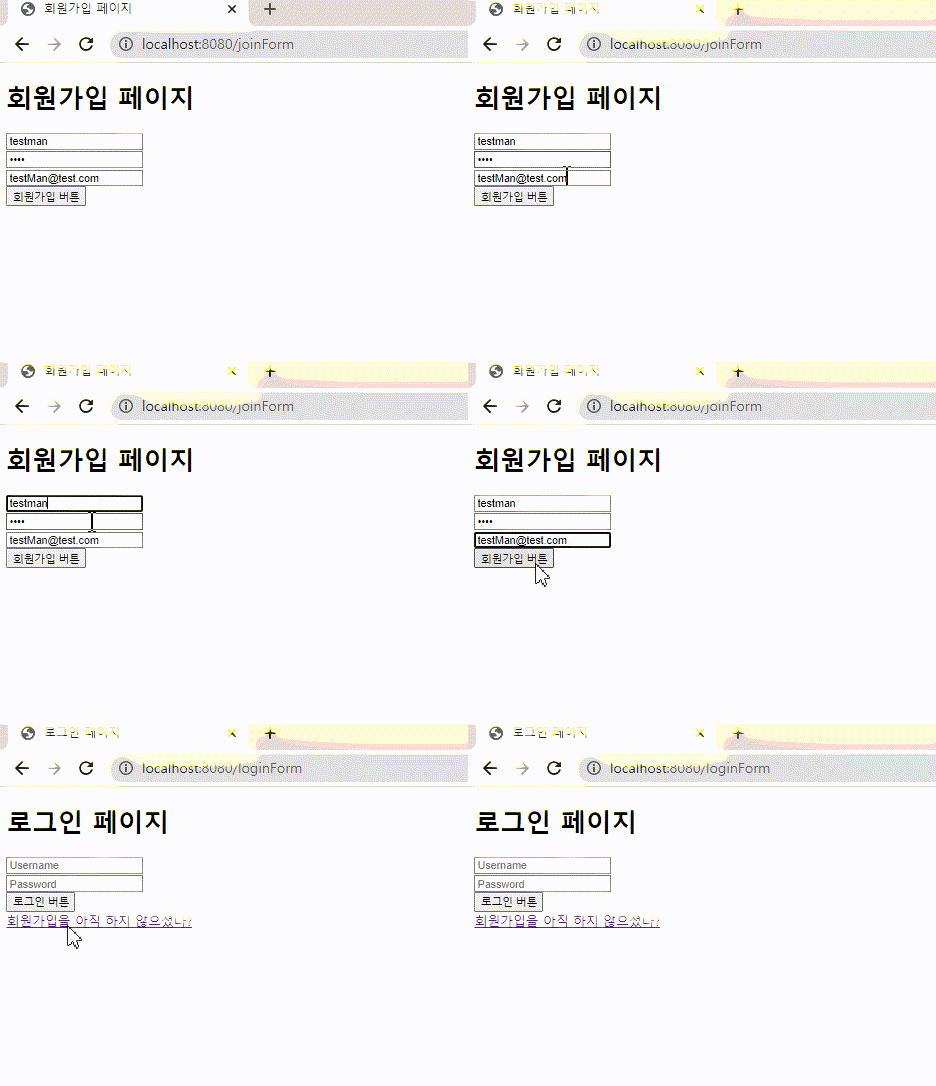
아이디와 이메일은 보는 그대로 설정했고 비밀번호는 1234를 입력했다.
그 후 회원가입 버튼을 누르면 Controller 에서 설정했듯이 (redirect:/loginForm) 으로 가는것 까지 잘된다.
데이터 베이스를 보자!

728x90
반응형
'Spring > Spring Security' 카테고리의 다른 글
| OAuth 개념 (0) | 2022.08.24 |
|---|---|
| Security 권한처리하기 (0) | 2022.08.24 |
| 시큐리티 로그인 (0) | 2022.08.24 |
| CORS (Cross-Origin Resource Sharing) 설정 (0) | 2021.12.13 |
| 스프링 시큐리티 (0) | 2021.11.23 |