728x90
반응형
전의 게시물과 이어짐
SecurityConfig
package com.example.security.config;

import org.springframework.context.annotation.Bean;
import org.springframework.context.annotation.Configuration;
import org.springframework.security.config.annotation.web.builders.HttpSecurity;
import org.springframework.security.config.annotation.web.configuration.EnableWebSecurity;
import org.springframework.security.config.annotation.web.configuration.WebSecurityConfigurerAdapter;
import org.springframework.security.crypto.bcrypt.BCryptPasswordEncoder;

// Ioc 등록
@Configuration
// web 활성화를 위한 어노테이션 spring security filter 가 스프링 필터체인에 등록
@EnableWebSecurity
public class SecurityConfig extends WebSecurityConfigurerAdapter {

    // @Bean 해당 메서드의 리턴되는 오브젝트를 Ioc 로 등록해줌
    @Bean
    public BCryptPasswordEncoder passwordEncoder() {
        return new BCryptPasswordEncoder();
    }

    @Override
    protected void configure(HttpSecurity http) throws Exception {
        http.csrf().disable();
        http.authorizeRequests()
                // 인증 필 / 인증 필요 + ADMIN, MANAGER 권한 필 / ADMIN 권한 필
                .antMatchers("/user/**").authenticated()
                .antMatchers("/manager/**").access("hasRole('ROLE_ADMIN') or hasRole('ROLE_MANAGER')")
                .antMatchers("/admin/**").access("hasRole('ROLE_ADMIN')")
                // 위의 권한 빼고는 다 진입가능하게 함
                .anyRequest().permitAll()
                .and()
                .formLogin()
                // 위 권한으로 접속시에는 login 페이지로 이동하게 됨
                .loginPage("/loginForm")
                // login 주소가 호출이 되면 시큐리티가 낚아채서 대신 로그인을 진행해줌
                // 컨트롤러를 만들어주지 않아도 됨
                .loginProcessingUrl("/login")
                // 기본연결 페이지
                .defaultSuccessUrl("/");
    }
}
auth/PrincipalDetails
package com.example.security.auth;

// 시큐리티가 /login 주소 요청이 오면 낚아채서 로그인을 진행
// 로그인 진행이 완료가 되면 시큐리티 session 을 만들어줌 (Security ContextHolder 공간에)
// 오브젝트 => Authentication 타입 객체
// Authentication 안에 User 정보가 있어야 됨
// User 오브젝트 타입 => UserDetails 타입 객체


// Security Session => Authentication => UserDetails type(PrincipalDetails)
// UserDetails 를 만들고 Authentication 에 넣은다음 SecuritySession 에 담음
// 지금 현재 클래스는 UserDetails

import com.example.security.model.User;
import org.springframework.security.core.GrantedAuthority;
import org.springframework.security.core.userdetails.UserDetails;

import java.util.ArrayList;
import java.util.Collection;

public class PrincipalDetails implements UserDetails {

    // 콤포지션
    private User user;

	// 생성자
    public PrincipalDetails(User user) {
        this.user = user;
    }

    // 해당 User 의 권한을 리턴하는 곳
    // role 은 String 이라서 바로 String 으로 반환하고 싶지만 안되서 오버라이드 한번 더
    // 안에 오버라이드는 String 으로 반환 가능
    @Override
    public Collection<? extends GrantedAuthority> getAuthorities() {
        Collection<GrantedAuthority> collection = new ArrayList<>();
        collection.add(new GrantedAuthority() {
            @Override
            public String getAuthority() {
                return user.getRole();
            }
        });
        return collection;
    }

    @Override
    public String getPassword() {
        return user.getPassword();
    }

    @Override
    public String getUsername() {
        return user.getUsername();
    }

    // 계정 만료
    // true = no
    // false = yes
    @Override
    public boolean isAccountNonExpired() {
        return true;
    }

    // 계정 잠김
    @Override
    public boolean isAccountNonLocked() {
        return true;
    }

    // 계정 기간 지남
    @Override
    public boolean isCredentialsNonExpired() {
        return true;
    }

    // 계정 활성화
    @Override
    public boolean isEnabled() {

        // 이런건 언제 false 사용하느냐
        // 나중에 로그인 했던 시간을 User 객체에 설정하고 가져와서
        // 현재시간 - 로그인 했던 시간이 1년이 넘는다면 false 반환
        return true;
    }
}
아래의 오버라이딩 된 것들은 Security 에서 자동설정 되어 있는 것들임
- 시큐리티가 /login 주소 요청이 오면 낚아채서 로그인을 진행
로그인 진행이 완료가 되면 시큐리티 session 을 만들어줌 (Security ContextHolder 공간에)
오브젝트 => Authentication 타입 객체
Authentication 안에 User 정보가 있어야 됨
User 오브젝트 타입 => UserDetails 타입 객체
Security Session => Authentication => UserDetails type(PrincipalDetails)
UserDetails 를 만들고 Authentication 에 넣은다음 SecuritySession 에 담음
지금 현재 클래스는 UserDetails
auth/PrincipalDetailsService
package com.example.security.auth;

import org.springframework.security.core.userdetails.UserDetails;
import org.springframework.security.core.userdetails.UserDetailsService;
import org.springframework.security.core.userdetails.UsernameNotFoundException;
import org.springframework.stereotype.Service;

// Service 로 메모리에 띄움Ioc
// 시큐리티 설정 .loginProcessingUrl("/login") 해둔 것으로
// /login 요청이 오면 자동으로 UserDetailsService 타입으로 Ioc 되어 있는 loadUserByUsername 함수가 실행
// 규칙임

@Service
public class PrincipalDetailsService implements UserDetailsService {

    /*
    여기서 중요한점
    아래의 loadUserByUsername(String username) 의 username 은
    현재 templates/loginForm 에 있는 input name=username 의 파라메터임
    username 이 일치하지 않으면 해당 데이터를 받아오지 못함
    만약에 바꾸고 싶다면 SecurityConfig 에서 설정가능,
    SecurityConfig 에서 .usernameParameter("username2") 이런식으로 변경
    하지만 바꾸지 않는것을 추천
     */
    @Override
    public UserDetails loadUserByUsername(String username) throws UsernameNotFoundException {

        return null;
    }
}
loginForm.html
<!DOCTYPE html>
<html lang="en">
<head>
    <meta charset="UTF-8">
    <title>로그인 페이지</title>
</head>
<body>
<h1>로그인 페이지</h1>
</hr>
<form action="/login" method="post">
    <input type="text" name="username" placeholder="Username"/> </br>
    <input type="password" name="password" placeholder="Password"/> </br>
    <button>로그인 버튼</button>
</form>
<a href="/joinForm">회원가입을 아직 하지 않으셨나?</a>

</body>
</html>
action = "/login" 설정
그 후 ...
/login 이 발동이 되면 스프링은 Ioc 컨테이너에서 userDetailsService 로 등록되어있는 것을 찾음 (loadUserByUsername)
=> parameter (username)을 가지고 옴
PrincipalDetailsService
package com.example.security.auth;

import com.example.security.model.User;
import com.example.security.repository.UserRepository;
import org.springframework.beans.factory.annotation.Autowired;
import org.springframework.security.core.userdetails.UserDetails;
import org.springframework.security.core.userdetails.UserDetailsService;
import org.springframework.security.core.userdetails.UsernameNotFoundException;
import org.springframework.stereotype.Service;

@Service
public class PrincipalDetailsService implements UserDetailsService {

    @Autowired
    private UserRepository userRepository;

    @Override
    public UserDetails loadUserByUsername(String username) throws UsernameNotFoundException {

        User user = userRepository.findByUsername(username);
        return null;
    }
}
// 받아온 parameter username 가 있는지 확인 findByUsername(username)
// userRepository 에는 기본적인 crud 만 있어서 함수를 새로 만들어주자
UserRepository
package com.example.security.repository;

import com.example.security.model.User;
import org.springframework.data.jpa.repository.JpaRepository;

// crud 함수를 JpaRepository 가 들고 있음
// Repository 어노테이션이 없어도 Ioc 됨
public interface UserRepository extends JpaRepository <User, Integer>{
    // JPA Query method
    // findBy 규칙 / Username 문법
    // select * from user where username = ? 이런식으로 호출
    public User findByUsername(String username);

}
그 다음 앞 게시물에서 설정했던 application.properties 에
spring.jpa.hibernate.ddl-auto=updatecreate => update 로 바꿔주자
안그러면 저장한 데이터 베이스가 날라가 버린다.
결과

추가적으로 확인 할 부분
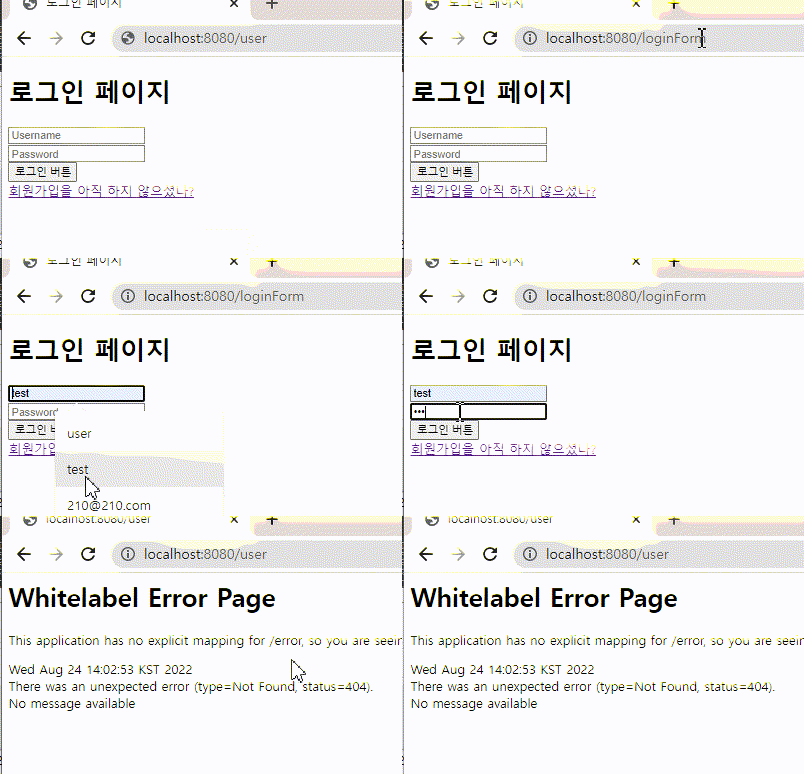
/user 에 간 후 로그인페이지에서 로그인을 하면
인덱스페이지 가 호출되는것이 아닌
/user 가 호출이 된다
현재 user 페이지에 아무것도 없어서 저렇게 뜨는것

/manager 로 가보면 type=Forbidden, status=403 이 뜨는데
이건 권한이 없어서 그런것이다 .
현재 test 계정의 권한은 user!
728x90
반응형
'Spring > Spring Security' 카테고리의 다른 글
| OAuth 개념 (0) | 2022.08.24 |
|---|---|
| Security 권한처리하기 (0) | 2022.08.24 |
| security 로 간단한 회원가입과 비밀번호 암호화 (0) | 2022.08.23 |
| CORS (Cross-Origin Resource Sharing) 설정 (0) | 2021.12.13 |
| 스프링 시큐리티 (0) | 2021.11.23 |