CSS Module을 사용하면 CSS 클래스가 중첩되는 것을 완벽히 방지할 수 있다
CRA로 만든 프로젝트에서 CSS Module을 사용할 땐 CSS 파일의 확장자를. module.css로 설정
.Role {
 background: black;
 color: white;
 padding: 2rem;
}
이런 식으로 하나 만들게 되면 해당 CSS 파일을 불러올 때 선언한 클래스 이름들이 모두 고유해진다
고유 CSS 클래스 이름이 만들어지는 과정에서는 파일 경로, 파일 이름, 클래스 이름, 해쉬값 등이 사용될 수 있다
className을 설정할 때에는 import로 불러온 styles 객체 안에 있는 값을 참조해야 함
import React from "react";
import styles from "./Box.module.css";

function Box() {
  return <div className={styles.Box}>{styles.Box}</div>;
}

export default Box;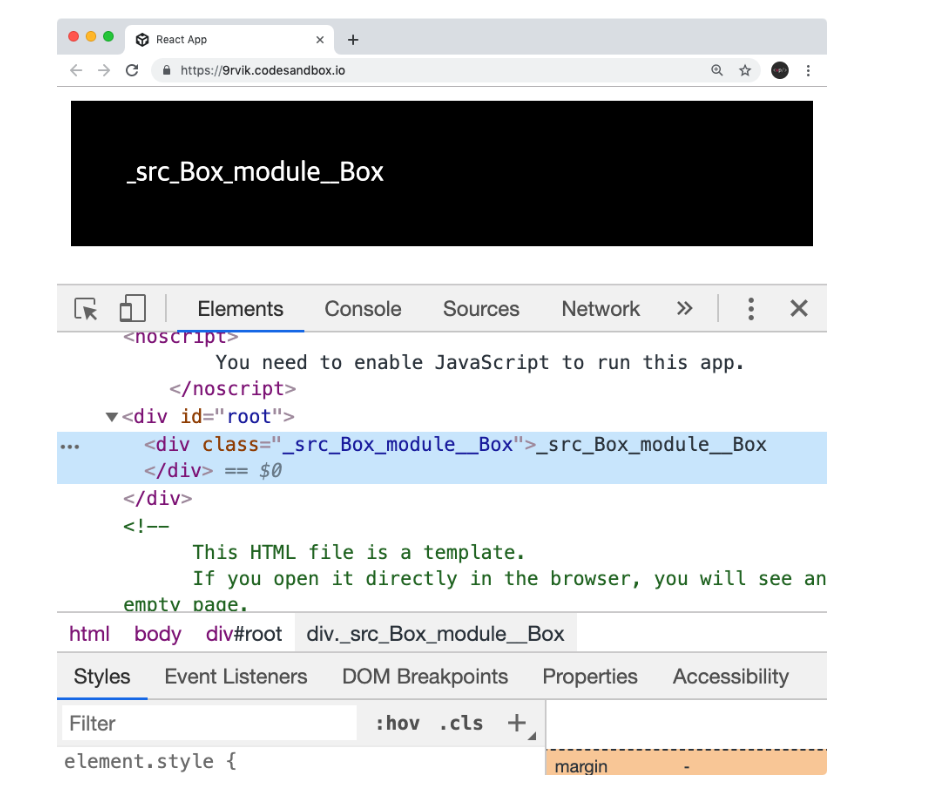
클래스 이름에 대하여 고유한 이름들이 만들어져서 다른 관계없는 곳에서 사용한 CSS 클래스 이름과 중복되는 것에 신경 쓸 필요가 없음
아래의 상황에 유용
- 레거시 프로젝트에 리액트를 도입할 때 (기존 프로젝트에 있던 CSS 클래스와 이름이 중복되어도 스타일이 꼬이지 않게 해줌.)
- CSS 클래스를 중복되지 않게 작성하기 위하여 CSS 클래스 네이밍 규칙을 만들기 귀찮을 때
각설하고 새프로젝트를 만들어보자
커스텀 체크박스 컴포넌트를 만들것!
$ npx create-react-app 프로젝트명* 별도로 설치해야 할 라이브러리는 없음
webpack에서 사용하는 css-loader 에서 지원됨
CheckBox.js
import React from "react";

function CheckBox({ children, checked, ...rest}) {

    return (
        <div>
            <label>
                <input type="checkbox" checked={checked} {...rest} />
                <div>{checked ? "체크됨" : "체크 ㄴ"}</div>
            </label>
            <span>{children}</span>
        </div>
    );
}

export default CheckBox;
App.js
import './App.css';
import {useState} from "react";
import CheckBox from "./components/CheckBox";

function App() {
  const [check, setCheck] = useState(false);

  const onChange = e => {
    setCheck(e.target.checked);
  }

  return (
      <div>
        <CheckBox onChange={onChange} checked={check}>
          다음 약관에 모두 동의하거라
        </CheckBox>
        <p>
          <b>check: </b>
          {check ? 'true' : 'false'}
        </p>
      </div>
  );
}

export default App;


...rest 의 경우는 전 글에도 게시했듯이 onChange 같은것을 바로 input에게 적용하기 위함
스타일링
$ yarn add react-icons이 라이브러리는 프론트엔드프레임워크 icon들을 컴포넌트형태로 쉽게 사용할 수 있다.
CheckBox.js
import React from "react";
import {MdCheckBox, MdCheckBoxOutlineBlank} from "react-icons/md";
import styles from './CheckBox.module.css';

function CheckBox({children, checked, ...rest}) {

    return (
        <div className={styles.checkbox}>
            <label>
                <input type="checkbox" checked={checked} {...rest} />
                <div className={styles.icon}>
                    {checked ? (
                        <MdCheckBox className={styles.checked}/>
                    ) : (
                        <MdCheckBoxOutlineBlank/>
                    )}
                </div>
            </label>
            <span>{children}</span>
        </div>
    );
}

export default CheckBox;
CheckBox.module.css
.checkbox {
    display: flex;
    align-content: center;
}

.checkbox label {
    cursor: pointer;
}

/* 실제 input 을 숨기기 */

.checkbox input {
    width: 0;
    height: 0;
    position: absolute;
    /* 불투명 */
    opacity: 0;
}

.checkbox span {
    font-size: 1.125rem;
    font-weight: bold;
}

.icon {
    display: flex;
    align-items: center;
    /* 아이콘의 크기는 폰트 사이즈로 조정 가능 */
    font-size: 2rem;
    margin-right: 0.25rem;
    color: #adb5bd;
}

.checked {
    color: #339af0;
}
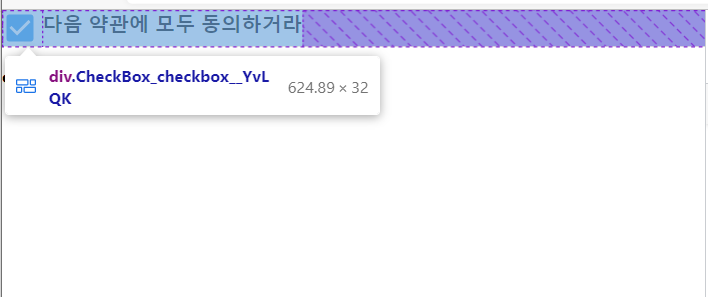
.icon 처럼 짧고 단순하게 해도 어차피 .module.css 덕분에 다른곳에서 중복 될 일이 전혀 없기 때문에
대충 지어도 된다.
* 클래스 이름에 - 가 있다면 ? styles['my-class'] 이런식으로 사용
* 여러개라면 ? ${styles.one} ${styles.two}
* 조건부라면 ? ${styles.one} ${condition ? styles.two : ''}
이런식으로 까다로워진다....
이전에 적었던 게시글의 classnames 라이브러리에서는 bind 기능이 있음!!!
응 라이브러리 설치
$ yarn add classnames
App.js
import React from "react";
import {MdCheckBox, MdCheckBoxOutlineBlank} from "react-icons/md";
import styles from './CheckBox.module.css';
import classNames from "classnames/bind";

const cx = classNames.bind(styles);

function CheckBox({children, checked, ...rest}) {

    return (
        <div className={cx('checkbox')}>
            <label>
                <input type="checkbox" checked={checked} {...rest} />
                <div className={cx('icon')}>
                    {checked ? (
                        <MdCheckBox className={cx('checked')}/>
                    ) : (
                        <MdCheckBoxOutlineBlank/>
                    )}
                </div>
            </label>
            <span>{children}</span>
        </div>
    );
}

export default CheckBox;
훨씬 간결해졌다
cx('one', 'two')
cx('my-component', {
  condition: true
})
cx('my-component', ['another', 'classnames'])
위 처럼 사용하면 된닿
** 기타내용
CSS Module 은 Sass 에서도 사용가능 확장자를 .module.sass 로 하기만 하면 됨 (sass 설치 필수)
전역화
:global .my-global-name {

}
sass 의 전역화
:global {
  .my-global-name {

  }
}
로컬
:local .make-this-local {

}
sass 의 로컬
:local {
  .make-this-local {

  }
}
'JS Library > React' 카테고리의 다른 글
| todolist 만들기 (0) | 2022.08.03 |
|---|---|
| styled-components (0) | 2022.08.02 |
| react-icons link (0) | 2022.08.01 |
| Sass (0) | 2022.08.01 |
| useReducer 요청 상태 관리 (0) | 2022.06.09 |
| API 연동하기, axios (0) | 2022.06.09 |